Buying a LiFePO4 Portable Power Station in 2025: Cycle Life, UPS Mode, and Solar Input Explained
Thinking about a portable power station for outages, camping, or remote work? Learn how to decode LiFePO4 cycle life, inverter watts vs. surge, UPS transfer times, and solar input specs before you buy.
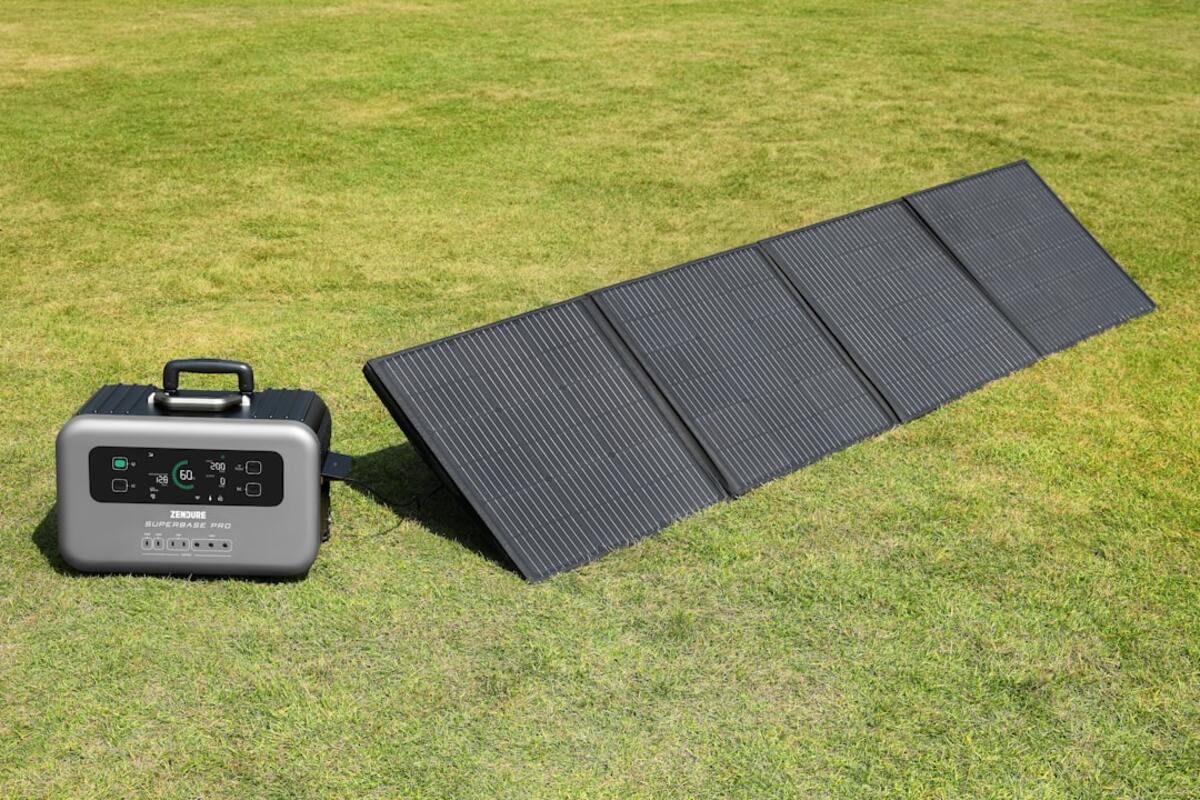
- LiFePO4 batteries last 4–6x longer than NMC; verify real cycle claims and warranty terms.
- UPS mode and pass-through charging aren’t the same; check transfer time and output stability.
- Match solar panel voltage to the station’s MPPT window; watts alone don’t guarantee fast charging.
If a storm knocks out power, a campsite needs quiet energy, or your van office must keep the laptop and router alive, a portable power station can feel like a lifesaver. In 2025, LiFePO4 (LFP) chemistry has gone mainstream, promising longer life, safer operation, and better value. But spec sheets are busy, acronyms are slippery, and a great price can hide expensive compromises in cables, solar compatibility, or fan noise. This guide breaks down the real buying signals—cycle life, inverter behavior, UPS mode, and solar input—so you can choose a unit that actually fits your use case.
We’ll translate watt-hours into runtime you can trust, flag the pitfalls of surge ratings and transfer times, and outline a checklist you can carry into any listing or store aisle. Whether you’re shopping for a weekend camping buddy or a home backup unit that can sit quietly yet spring into action, read this before you hit buy.
What to check first: battery chemistry, capacity, and cycle life
The battery is the heart of the station, and in 2025, LiFePO4 (LFP) models dominate for good reason. Compared to traditional NMC (Nickel Manganese Cobalt), LFP typically offers higher cycle life and improved thermal stability. That translates to a system that can be charged and discharged many more times before losing significant capacity—ideal for frequent use, solar integration, or multi-day outages.
Cycle life claims vary widely. Many reputable LFP stations advertise 3,000–4,000 cycles to 80% capacity; premium units may claim 6,000+. Look beyond marketing: What does the warranty say? Some brands promise high cycle counts but only back the product for 2–3 years. Others pair high cycles with a 5-year warranty, a welcome signal of confidence. Remember that “to 80% capacity” means the battery still works but at reduced stored energy—so a 1,024 Wh unit might effectively behave like ~820 Wh after the rated cycles.
Capacity (Wh) equals stored energy, but the number on the box doesn’t translate directly to usable runtime. Expect conversion losses: AC inverters typically deliver 80–90% efficiency, and DC outputs can vary. To estimate runtime, take capacity × inverter efficiency ÷ device load. Example: a 1,024 Wh station powering a 120 W fridge at 85% AC efficiency yields roughly 1,024 × 0.85 ÷ 120 ≈ 7.25 hours. Factor in startup surges and intermittent cycling for appliances like fridges; real-world results often land higher for cycling loads.
Charge and discharge rates matter too. Stations list max AC charging input (e.g., 1,000 W) and solar input limits. Faster charging is convenient, but aggressive charging can warm cells and spin fans louder. Look for settings that let you limit charge speed—nice for overnight tops-offs or when sharing a circuit with other devices.
| Spec label | What it actually means | Good in 2025 |
|---|---|---|
| Chemistry | LFP (LiFePO4) vs. NMC. LFP = longer life, safer, heavier. | LFP for most users; NMC only if weight is critical. |
| Capacity (Wh) | Total stored energy at standard test conditions. | Match to loads; 500–700 Wh (day trips), 1–2 kWh (weekend), 2–5 kWh (home backup). |
| Cycle life | Number of 0–100% cycles before capacity falls to ~80%. | ≥3,000 cycles claimed; check warranty length and terms. |
| Inverter (W) | Continuous AC output; surge handles short spikes. | Continuous ≥ your heaviest load; surge ~2× continuous. |
| UPS/EPS | Transfer time from grid to battery output. | ≤10–20 ms for PCs/routers; test with your gear. |
| Solar input | MPPT range (V), current (A), and watts (W) allowed. | MPPT controller, clear voltage window, decent amp limit. |
| Low-temp charging | Protection that blocks charging below a threshold. | Built-in preheating or clear cutoff specs (e.g., 0–5°C). |
| Noise | Fan loudness under charge/discharge. | < 45 dB for indoor night use; variable fan curves. |
Weight is the other hidden factor. LFP’s longevity comes with heft: a 1–1.5 kWh station may weigh 10–18 kg (22–40 lb). For apartments without elevators or rooftop camping setups, check dimensions and ergonomic handles. Wheels help on 2–5 kWh units, but stairs will still be a workout.

Key features decoded: inverter watts, UPS mode, and solar input
Inverter specs look simple—“1,200 W continuous, 2,400 W surge”—but behavior matters. Continuous watts is the sustained output; surge is the short spike the inverter can absorb for milliseconds to a few seconds. Induction cooktops, compressors, power tools, and gaming PCs with high transient loads benefit from a strong surge margin. If your load flutters near the continuous limit, the station may fault or throttle; leave headroom (20–30%) to avoid nuisance shutdowns.
Eco modes can be a blessing and a gotcha. Some stations auto-sleep if output power falls below a small threshold for a set time, cutting power to save energy. That’s great for idle devices but can interrupt ultra-low loads like Wi‑Fi routers during off-peak. The best units let you disable Eco mode per port or adjust the timer.
UPS mode vs. pass-through charging is a common confusion. Pass-through simply means the station can output AC while charging from the wall. UPS (or EPS) implies the station monitors grid input and, if the power drops, transfers to battery without manually turning it on. Transfer time matters. Many portable stations are “line-interactive” with 10–20 ms transfer. That’s fine for routers and many desktop PCs, but some sensitive PSUs or servers expect 0 ms (online UPS style). If you’re protecting work-critical devices, test your exact setup—don’t assume spec-sheet compatibility.
Also, check whether UPS mode provides pure sine wave during transfer and under all load levels. Modern stations typically do, but inexpensive models can degrade wave quality under low loads, causing buzzing in audio gear or heat in some chargers. If you run studio equipment, confirm pure sine at low watts and consider an isolation transformer for the cleanest signal.
Solar input is the other big lever. An integrated MPPT (Maximum Power Point Tracking) controller is standard now, but its voltage window and amp limit define what panels you can safely use. A spec might read “12–60 V, 10 A, 400 W max.” You must keep the panels’ open-circuit voltage (Voc) within that range and not exceed 10 A input. Two 200 W, 20 Vmp panels in series might deliver ~40 Vmp (within range) but keep an eye on cold-weather Voc, which rises as temperatures drop. If winter Voc could exceed 60 V, rewire to parallel or add a panel with lower Voc.
Connectors vary: MC4 is the outdoor standard; many stations accept solar via MC4-to-XT60 or MC4-to-8 mm adapters. Verify which adapter ships in the box—some brands omit solar cables entirely. And note that watts on the panel sticker rarely equals watts into the battery: angle, temperature, clouds, and MPPT efficiency matter. Seeing 60–80% of rated panel watts in real conditions is normal.
Charging flexibility separates great stations from good ones. Nice-to-have features include: adjustable AC charge rate (for silent overnight charging), separate DC car charging profiles (12 V/24 V), and dual-input charging (AC + solar concurrently) with sensible thermal limits. If you plan to live on solar, prioritize stations that can safely accept their full solar wattage while still powering DC loads without derating.
Safety and longevity features deserve attention. Look for clear low-temperature charging cutoffs (LFP shouldn’t charge below freezing without warming), overcurrent/overvoltage protection, and well-documented BMS (Battery Management System) behavior. Some stations include cell heaters to enable cold-weather charging; others require keeping the unit above a minimum temperature before charging begins.
Hands-on checklist: how to compare models and avoid hidden costs
When two stations look similar on paper, a practical evaluation reveals the better buy. Here’s a concise approach you can apply in-store, on a product page, or while watching video reviews.
- Define your top three loads and durations. Example: fridge (120 W cycling, 12 h), laptop (65 W, 8 h), router (12 W, 24 h). Total the watt-hours with a 15–20% buffer for inverter losses.
- Pick chemistry and warranty first. Choose LFP for longevity; validate the warranty length (aim for 4–5 years) and cycle coverage details.
- Match inverter to your true needs. If your biggest draw is 800 W, consider 1,000–1,200 W continuous with 2× surge. Leave headroom for spikes.
- Check UPS claims. Look for transfer time (ms), sine wave quality, and whether UPS works on all AC outlets or only a dedicated one.
- Study solar input. Ensure your planned panel Voc and Isc fit the MPPT window and amp limit. Confirm which adapters are included.
- Listen for fan behavior. Reviews noting loud fans at 100–200 W loads might be a red flag for indoor night use.
- Inspect ports. Are there enough USB‑C PD ports at 100 W? Is there regulated 12 V output for fridges? Are the outputs active without waking a screen?
- Weigh the weight. If you need mobility, choose sub‑15 kg for frequent carry; add wheels or modular expansion for larger systems.
- Check app control. Offline control via Bluetooth is handy; Wi‑Fi adds remote monitoring and firmware updates.
- Budget cables and panels. Add the price of MC4 adapters, extension leads, fuses, and roof/camp mounting hardware.
Runtime math is your friend. A small 300 W espresso machine used for 6 minutes is only 30 Wh, but a 1,500 W kettle for 5 minutes is 125 Wh. High power for short bursts can be less costly than moderate power for hours. Estimate daily consumption and compare against capacity and replenishment plans (wall, car, or solar) to see if your setup closes the loop.
Port selection has improved in 2025. USB‑C PD at 100 W or even 140 W is common; avoid stations with only USB‑A if you depend on laptops and tablets. For DC fridges, ensure a regulated 12 V output that stays at ~13.2 V under load, not a sagging port that confuses compressor controllers. On AC, multiple outlets are nice, but quality beats quantity—fewer sturdy sockets with proper spacing can be more useful than a cluttered faceplate.
Idle draw and parasitic losses separate polished designs from raw ones. Some stations pull 10–20 W just to keep the inverter on, which can drain significant capacity overnight. If you mainly run USB and DC gear, look for models that let you turn AC off independently and that keep DC idle draw under a few watts.
Assess displays honestly. A bright color LCD is great, but ask: Does it show per-port power? Does it include state-of-charge percentages and estimated time to empty at current load? Can it calibrate after a full charge/discharge? A display that only shows a vague bar can be frustrating when you’re trying to manage a long outage.
There are also quiet cost traps:
- Solar cabling: MC4 extension leads at proper gauge (10 AWG) add cost and weight; cheap thin cables mean hot runs and voltage drop.
- Adapters: XT60 vs. 8 mm vs. Anderson? If your station doesn’t include the right adapter, you’ll pay more and wait longer.
- Mounting: Foldable panels are portable but pricier per watt; rigid panels are cheaper but need brackets or stands.
- Firmware: New features arrive via updates; without Wi‑Fi/Bluetooth updates, bugs can linger.
If you’re choosing between two similarly priced units, pick the one with a longer warranty, clearer documentation, and better thermal management. It’s the combination that saves you money over years: stable UPS, adjustable charge rates, efficient inverter, and a BMS that protects the pack without nuisance trips.
For most buyers, yes. LFP offers far higher cycle life and better thermal stability, which is ideal for frequent cycling, solar use, and long-term ownership. NMC is lighter for the same capacity, which matters for ultralight setups or if you must carry the station daily. If weight isn’t the priority, LFP delivers the best value.
For most buyers, yes. LFP offers far higher cycle life and better thermal stability, which is ideal for frequent cycling, solar use, and long-term ownership. NMC is lighter for the same capacity, which matters for ultralight setups or if you must carry the station daily. If weight isn’t the priority, LFP delivers the best value.
Sometimes. Many stations have 10–20 ms transfer times, which most PCs and routers tolerate. However, some power supplies or servers expect near‑instant transfer or online conditioning. Test your exact gear and consider a traditional UPS if you notice reboots or if you need guaranteed sub‑10 ms performance.
Sometimes. Many stations have 10–20 ms transfer times, which most PCs and routers tolerate. However, some power supplies or servers expect near‑instant transfer or online conditioning. Test your exact gear and consider a traditional UPS if you notice reboots or if you need guaranteed sub‑10 ms performance.
Start by listing essentials for 24 hours: fridge (600–1,000 Wh), router (300 Wh), phone/laptop charging (200–400 Wh), a few LED lights (50–100 Wh). A 1.5–2 kWh station covers most modest setups for a day with careful use. If outages stretch multi‑day, add solar or step up to 3–5 kWh or modular expansions.
Start by listing essentials for 24 hours: fridge (600–1,000 Wh), router (300 Wh), phone/laptop charging (200–400 Wh), a few LED lights (50–100 Wh). A 1.5–2 kWh station covers most modest setups for a day with careful use. If outages stretch multi‑day, add solar or step up to 3–5 kWh or modular expansions.
Yes—on most modern stations—but continuous pass‑through increases heat and fan runtime. If you plan to keep the unit on 24/7, choose one with a dedicated UPS/EPS mode, adjustable AC charge rate, and good ventilation. Periodically let the battery rest around 40–60% if you won’t need it, which can reduce long‑term stress.
Yes—on most modern stations—but continuous pass‑through increases heat and fan runtime. If you plan to keep the unit on 24/7, choose one with a dedicated UPS/EPS mode, adjustable AC charge rate, and good ventilation. Periodically let the battery rest around 40–60% if you won’t need it, which can reduce long‑term stress.
LFP shouldn’t be charged below freezing unless the unit has a built‑in heater designed for that purpose. Many stations block charging beneath 0–5°C to protect cells. If you camp in winter, pick a model with preheating or plan to warm the battery before charging. Discharging in the cold is generally safe, though capacity dips at low temperatures.
LFP shouldn’t be charged below freezing unless the unit has a built‑in heater designed for that purpose. Many stations block charging beneath 0–5°C to protect cells. If you camp in winter, pick a model with preheating or plan to warm the battery before charging. Discharging in the cold is generally safe, though capacity dips at low temperatures.
Finally, watch for red flags hidden in the fine print:
- Vague solar spec (“400 W max”) without a voltage and current window—this invites mismatches.
- No mention of inverter efficiency or idle draw—expect worse‑than‑average performance.
- Short warranty for claimed high cycle life—marketing may be optimistic.
- Fans that engage at very low loads—annoying for bedroom or studio use.
- No spare parts or cable listings—harder to maintain long‑term.
Do your math, map your loads, and favor stations that communicate clearly about MPPT ranges, transfer times, and thermal behavior. A well-chosen LiFePO4 power station won’t just work on day one; it will keep working years later, through storms, trips, and projects—quietly, safely, and predictably.